


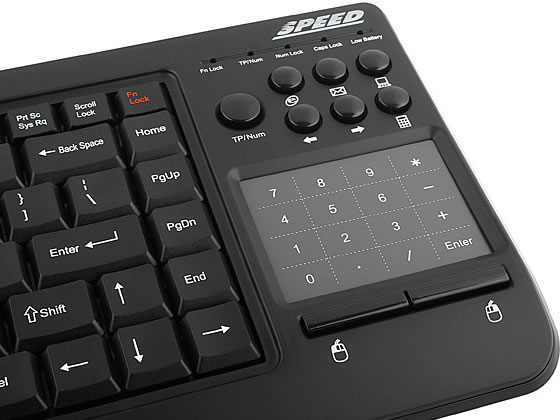
This new USB keyboard comes with 87 keys, 18 hot keys, a built-in high precision multi-Touch touchpad and it works wirelessly from distances of up to 10 meters.
The touchpad part can be functioned as a numeric keypad. It is easy to switch the touchpad to be a numeric keypad by one button. In addition, the compact, slim and portable design can be used for travel, school o any other working environment.
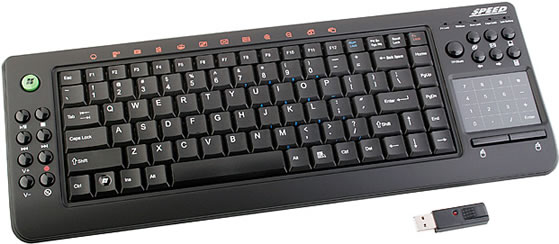
Features:
- 87 keys slim link office keyboard
- Powerful office function with 87 keys and 18 hotkeys
- Space-saving, centrally positioned Touch Pad with Smart Function
- Click and Right Click buttons
- Built-in battery LOW LED
- ON/OFF switch Design
- Operating distance: 10 meters
- Operating frequency: 2.4GHz ISM Band
- Frequency Scope: 2479MHz
- Device ID Length: 32Bits
- Modulation/Data Rate: FSK/IMbps
- FN: Num lock change function
- Support Window XP/Vista
- Dimension: 425 x 153 x 18mm (approx.)
- Weight: 462g
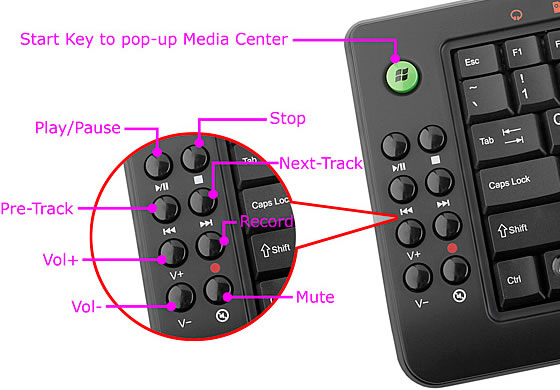
You can purchase the USB 2.4GHz RF Entertainment Slim Keyboard with Smart TouchPad for $69 over at the USB Brando website.
9 Comments
That will be a perfect fit for my media center. Thanks for sharing !
wow thats gotta be the coolest keyboard ive ever seen.
is it compatible with win 7? any idea?
the website has a link to a windows 7 driver, so yes. Maybe not out of the box though…
http://usb.brando.com/usb-2-4ghz-rf-entertainment-slim-keyboard-with-smart-touchpad_p00973c034d15.html
@Tony
I received this as a Christmas present and I can confirm that the Windows 7 drivers do not work on Windows 7 64bit.
I mananged to get it working by messing with the Vista 64bit driver disc that came with, but it can be tempermental. When its behaving its great, if a little cramped, but it does have a habit of doing wierd things which are only cured by doing a restart 🙁
This device has an obvious design-flaw! Such a device is normally used as a controlunit when sittig in front of a media center on the couch in a living room. Both mousefunction are on the very right side of the keyboard. When using it as a mouse, you have to move both hands to the right. And this is very inconvenient, because you cannot work in this way without putting the device on a table or so. In this mode of operation you need the mousekeys on the left side for the left hand and the touchpanel on the right side for the right hand. This allows you even to hold the keyboard with both hands or sit relaxed in front of the keyboard and operate the mouse in parallel.
I have a keyboard with the correct layout of the mousefunctions, therefor I know what I am talking about.
Regards
DON’T BUY THIS! The quality is CRAP. The driver disc wouldn’t work, and the packaging didn’t even include the manufacturer’s name, website, contact info – nothing! It’s a fly-by-night outfit peddling crap!
had this keyboard as i was looking for a TOUCHPAD KEYBOARD for my gaming/media center pc,as my pc is plugged into my tv and i dont watch tv i use my computer.
but anyway this was the third touchpad keyboard i had!i bought 5 different ones till i found the best one for me.
SEE WITH THIS KEYBOARD MY COMPUTER IS NEVER FAR FROM WHERE I SIT AND I MEAN REALLY CLOSE LIKE THE TV TO THE COUCH AT FURTHEST but i had really bad signal issues with this keyboard and i mean very bad!! when the batterys where duracel or something good when they where brand new it was not too bad but still not good but within a hour of new batteries it was terrible i was having to hold the keyboard in the air sometimes i could never sit how i wanted too with the keyboard. I CAN HONESTLY SAY THE WIRELESS RANGE OF THIS KEYBOARD IS UTTER CRAP AND I MEAN TERRIBLE,but one thing i did like was the shortcut keys they where not too bad,but honestly ignore this 10 meter range rubbish i could get 1 meter at best for it to be usable could go further but having to hold it in the air and stuff even a meter away if you blocked it at all ie leaning over it the signal would drop,i would be touch typing and end up having a lot of letters missing from what i was typing. i tried everything i thought it was interferance but tried having just it on and tried a usb extension wire so it was away from the pc still never got better i even got a replacement keyboard because of it but it was just the same.
all of the keyboards i have bought with a touchpad the biggest problem was signal quality they just used to all drop out but out of all of them this was by far the worse,i had another it had a mouse scroll wheel on the top left of the keyboard and it had a really good multi-touch and a lot of good features i tried to find a link maplin used to sell them but couldnt find a link.
well in my search for signal quallity i eventually bought a LOGITEC K400 i only bought it because i spilled something on the keyboard abouve i had actually given up i was planning on saving for a apple keyboard with the clip on touchpad but i am honestly glad i spilled juice on my keyboard and got the K400 as the signal is great i can go anywhere in my house with it and it really just remembers me of a laptop keyboard it is very high quallity and responsive plus it has good software from logitec plus it uses there unifiying micro usb blutooth dongle so u can use a few different logitec wireless products just with one dongle,the only reason i did not buy the K400 in the first place is because i thought it would have been on of those micro keyboards like the TOMTOP ones from ebay cheap chinese handheld rubbish!.the K400 looked a lot smaller in the pictures it was just new at the time and no reviews but i can say i am really happy with it but the only thing the touchpad does is a two finger scroll gesture when i bought it i could pinch to zoom and other gestures but the drivers changed in a update but apparently the keyboard never done more than one gesture but mine definitely did,only downfall of the k400 is the lack of shortcut buttons and maybe a scroll wheel would have been nice but i can say that this is the best touchpad keyboard on the market today for a reasonable price.it is also extremely lite weight for its size i can fit my two hands over it twice so four of my hands is the size and i have average size hands i would say.
LOGITEC K400 BEST TOUCHPAD KEYBOARD ON THE MARKET FOR A REASONABLE PRICE,THERE ARE SOME BETTER ONES AT HIGHER PRICE RANGES BUT THIS IS THE BEST ALL ROUNDER
la bateria dura muy poco como 4 horas aproximadamente