
Wireless USB Keypad with Trackball

Wireless USB Keypad with Trackball

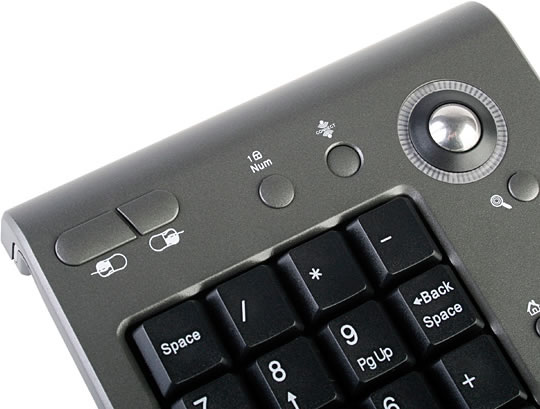
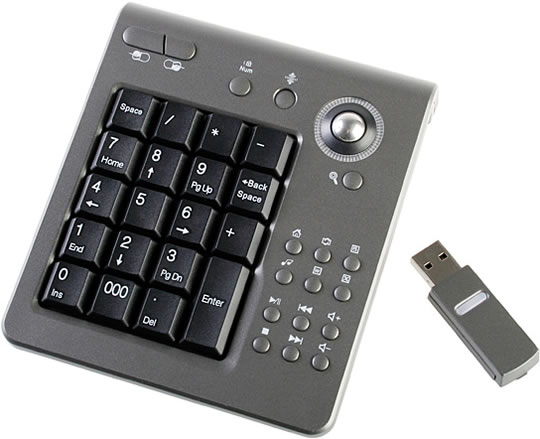
This wireless keypad features 19 standard keys, 13 hot keys and a high precision 1000DPI trackball. The wireless transfer is done using a 2.4 GHz radio frequency.

Features:

  • 19 keys slim link off keyboard
  • Built-in trackball for optical mouse
  • Resolution: 1000
  • Powerful office function with 19 keys and 13 hotkeys
  • Operating distance: 10 meters
  • Operating frequency: 2.4GHz Radio frequency
  • Operating current: 35mA max. (Keybaord)
  • Operating current: 15mA max. (Receiver)
  • FN: Num lock change function
  • Support Windows 2000/XP/Vista
  • Dimension: 114 x 134 x 25mm (approx.)
  • Weight: 143g

Wireless USB Keypad with Trackball

Hot Keys:

  • Mouse Left Key, Mouse Right Key
  • Num Lock
  • Window Magnifier
  • www, Email, Media, Power Point, Word, Excel
  • Play/Pause, Prev Track, Vol +, Stop, Next Track, Vol

The Wireless USB Keypad with Trackball is available from USB Brando for $37.

Facebook Twitter Stumbleupon Reddit Pinterest Digg Delicious Technorati Email

Related Articles

Robert Birming

About Robert Birming

Based in Stockholm, Sweden, Robert is a blogger and musician with an eye on innovative gadgets and design geekiness.

25 Responses to “Wireless USB Keypad with Trackball”

  1. Cute USB. Would have made a great stocking stuffer. :)

  2. It’s look useful stuff for traveling. Small and Wireless are best choice.

  3. It’s 2.4GHz frequency, that’s bluetooth technology! The good thing about this is that due to the high frequency, it will not get interupted by other frequency can easily and also the line of sight distance is very long as compared to IR.

  4. wow, everything are going wireless nowadays.

  5. Very nice but I wish manufacturers would start making tiny wireless receivers like one of the logitech mice have

  6. I like the look of this. Will have to get myself one of those

  7. Very great innovation and idea. It would also be greater if they also make wireless Wingman(Gamepad) and Wheelman and joystick for gaming!

    I noticed though, it’s ridiculous for it to have word processing and email hotkeys only to find out that the keypad is purely numeric, you can’t even enter your username with that!

  8. Love the track ball function and the short cut keys. Seems very convenient. :)

    I doubt about the 10 meter distance though. I guess it will go to a max of 5 meters. Had wireless product like this too.

    And agree with above. Word processing seems redundant. But it’s still a great add on to the keypad. :)

  9. Looks like a nice little gadget, will have to look into it.

Trackbacks/Pingbacks

  1. USB Gadgets - USB Wireless Trackball Keypad | Geeky Gadgets - December 30, 2008

    [...] Geek Alerts Share and [...]

  2. Wireless Keypad And Tracking Ball | Coated dot Com - The Gadget Authority - December 30, 2008

    [...] [Via] Share and Enjoy: [...]

  3. Wireless USB Keypad with Trackball and Hot Keys | Thinktechno.com - December 30, 2008

    [...] GeekAlerts If you enjoyed this post, make sure you subscribe to the RSS feed! You can also subscribe by [...]

  4. pirata blog » Numpad inalámbrico para tu portátil - December 30, 2008

    [...] compraste una laptop y extrañas el numpad de tu computadora de escritorio? No te preocupes, no sólo con este podrás sustituirlo sino [...]

  5. Wireless Keypad for your Laptop | Gadget Folder Free Gadget Review - December 30, 2008

    [...] Source Wireless USB Keypad with Trackball [...]

  6. Wireless USB Keypad with Trackball Combo | Keyboards - January 2, 2009

    [...] (via GeekAlerts) [...]

  7. Weekly Roundup Jan 04 2009 | GadgetLite - Latest gadgets and technology news... - January 4, 2009

    [...] Wireless USB Keypad with Trackball | GeekAlerts [...]

  8. Wireless Keypad offers Freedom with Your Keyboard Usage and No More Wires - January 14, 2009

    [...] [Via Geek Alerts] [...]

  9. USB Keypad with Spacebar | GeekAlerts - June 9, 2009

    [...] keypad with cover and the keypad with trackball have already been invented, so what to do next? Of course, let’s throw in a spacebar instead [...]

  10. | AYD Bilgisayar | Driver Download & Güncel Bilişim Haberleri - USB keypad - July 2, 2009

    [...] Laptop’ların en büyük eksikliklerinden birisi olan keypad’leri artık USB ile kendimiz ekleyebiliyoruz. Sadece keypad olmasının dışında mouse’un sol ve sağ tuşunun da bulunduğu bu cihaz son derece portatif. Kaynak [...]

  11. www.bilgince.com » Wireless USB Keypad with Trackball - March 9, 2010

    [...] bildiği gibi klavyenin sağ tarafındaki keypadlar yoktur. İşte bu alet tam da bunun için. Bu keypadı kendimiz USB’si yardımıyla kullanabiliyoruz. Bunun yanında fare işlevi gören sağ ve sol [...]

  12. Pc. Sevdalimsin.net » Blog Archive » Wireless USB Keypad with Trackball - March 9, 2010

    [...] bildiği gibi klavyenin sağ tarafındaki keypadlar yoktur. İşte bu alet tam da bunun için. Bu keypadı kendimiz USB’si yardımıyla kullanabiliyoruz. Bunun yanında fare işlevi gören sağ ve sol [...]