


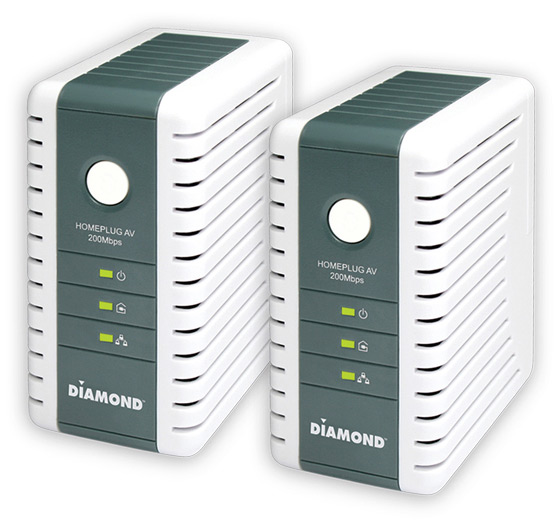
Unless you are lucky enough to live in new construction, chances are your home is not wired for computer networking. Because of the exorbitant expense and hassle of adding wiring inside existing walls, the solution for many is wireless networking. Even though wireless networking keeps getting better, it still has issues with walls and floors and lags wired connectivity in terms of bandwidth, latency, security, and stability. For a wired solution without adding any wires to your house, consider the Diamond Multimedia HP200AV Powerline AV Ethernet Adapter Kit. It is the easiest way to get Internet to the far corners of your house to enable things like Internet TV, online gaming with your console, and browsing the Internet in whichever room you desire.
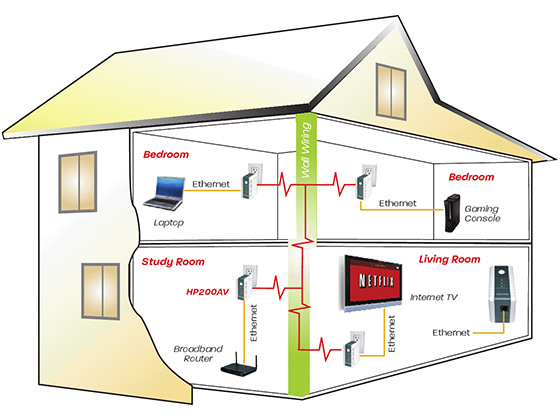
The Diamond HP200AV kit turns your home power lines into a wired data network. Just plug one of the units into a electric outlet and then attach it via an Ethernet cable to your router. Then you can plug the other HP200 unit into an outlet elsewhere in the house (say by your laptop computer, gaming console, or Internet ready TV/Bluray player) and it provides a wired network outlet for you to plug into. Suddenly you have a high-speed (up to 200 Mbps) networking connection, with high speed and reliability like a wired network.
The company was nice enough to send one of these Diamond Powerline AV Computer Networking Kits to GeekAlerts.com for testing. This allowed us to see firsthand just how easy this was to use. We literally just opened the box and plugged the units into different electric outlets. Then we plugged one into a switch and the other into a computer using the included CAT5 cables. That was it! It just simply worked immediately with no drivers or software installation.
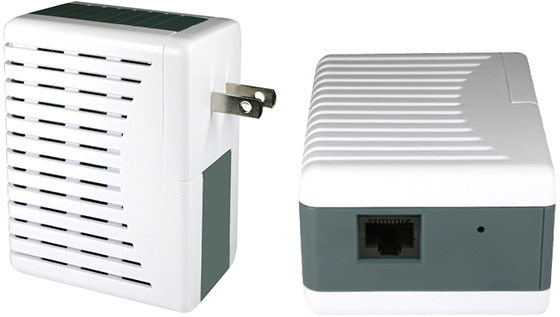
We ran a quick test by copying a folder with hundreds of files over the local network, and it transferred the data at an average of 36Mbps. Slower than the maximum speed of 200Mbps for sure, but plenty fast for HDTV over Internet and typical home network usage, all without any configuration or optimization. To check the approximate connection rate you are getting, just look at the color of the Powerline Activity LED indicator on either unit: below 30Mbps (Red), 30-80Mbps (Amber), or above 80Mbps (Green). For security just press the Simple Connect button on each unit to enable 128-bit AES encryption.
If you have a wireless network that doesn’t cover your whole house, this Diamond HP200AV can provide the easy solution to extend your coverage. Use this powerline ethernet kit to provide networking to the other side of the house (or to the second floor), where you can plug in a second wireless access point. With two wireless access points (separated widely without new wires with the HP200 AV) instead of one, you can achieve high quality WiFi coverage throughout a large home.

The Diamond HP200AV easily connects internet ready devices to an Ethernet connection without the need for new cables and wiring. The Diamond HP200AVconnects PCs, modems, routers, game consoles and IP set-top boxes via power lines in a home or office.
Installation is a plug and play process designed for quick connection. The first adapter is plugged into an AC wall outlet and then connected to a router. The second adapter is free to be plugged into any available wall outlet and is easily paired with the click of one button. With speeds of up to 200Mbps, the HP200AV supports Internet Television (IP-TV in HD quality), video-on-demand, VoIP Telephony and fast Internet access. It achieves a range of up to 200 meters within a single power line grid, enabling the greatest reliability and flexibility to connect network-enabled devices throughout a home or office.
Order the Diamond HP200AV for $79.99 direct from Diamond Multimedia. This power line networking kit is also available for $64.99 (and free shipping) from Amazon.com, for $79.99 from Newegg.com, and for $79.99 at J&R .
3 Comments
It looks great, but I still have concerns about latency, what with it being a wireless solution. I’d love to see how internet speedtest results compare between this and a regular LAN connected computer.
I’m not sure if I’m misinterpreting what you mean by “wireless solution,” but this is not wireless like with WiFi, 802.11g, etc. Although it is wireless in that there is no wiring of Cat5 cables through the walls or across the floor, it uses the power wires to transmit the data.
I think that most people will not notice much difference compared to a normal wired network. I just ran Speedtest.net to test it out. First I ran the test twice with my normal Gigabit Ethernet connection (running through a 5 port and a 24 port switch) to my router, and then twice using the Diamond HP200AV (still running through the two switches after the Powerline connection) to my router. Here are the results:
Gigabit Ethernet Test 1
——————————
16 ms ping
22.10 Mbps download
0.96 Mbps upload
Gigabit Ethernet Test 2
——————————
15 ms ping
20.88 Mbps download
0.98 Mbps upload
Diamond HP200AV Test 1
———————————-
15 ms ping
18.46 Mbps download
0.98 Mbps upload
Diamond HP200AV Test 2
———————————-
18 ms ping
20.67 Mbps download
0.98 Mbps upload
Even though the Diamond Powerline was added in addition (not in replace of) my Ethernet switches, you can see that latency/ping is not noticeably affected.
Download bandwidth is slightly reduced (average of 19.57 Mbps vs. 21.49 Mbps for a reduction of 8.9%), but not noticeably since it is similar in amount to the variance seen from one run of Speedtest to the next without changing connections. On the other hand, I did have the powerline networking running through two nearby electric outlets, and at greater distances the bandwidth would be reduced. YMMV based on how far away the outlets are, the quality of your electrical wiring, and noise generated by other electronics plugged into your home power grid.
Wow, that’s great! Thanks James. Yeah, by wireless I meant no cables between base and receivers. I realise these units aren’t using the wifi specification, and that most people won’t notice the difference when browsing, checking email, etc., but certain high bandwidth environments (like some online games) don’t support wireless networking at all because it increases latency. If the Diamond HP200AV is legal in the UK, I will definitely be investing in one after seeing the result of that speedtest. Thanks again!