

Close Menu
  • News + Trailers
    • Movies & TV
    • Video Games
  • Categories
    • Gadgets
    • Toys
    • Style
    • Food
    • Design
    • Books
  • Popular
    • Star Wars
    • Marvel
    • Rick and Morty
    • Doctor Who
    • Harry Potter
    • Star Trek
    • Batman
    • Game of Thrones
    • Bob’s Burgers
  • Deals
  • Coupons
Facebook X (Twitter) Instagram
  • Home
  • About
  • Contact
  • Follow
Facebook X (Twitter) Pinterest RSS
GeekAlertsGeekAlerts
  • News + Trailers
    • Movies & TV
    • Video Games
  • Categories
    • Gadgets
    • Toys
    • Style
    • Food
    • Design
    • Books
  • Popular
    • Star Wars
    • Marvel
    • Rick and Morty
    • Doctor Who
    • Harry Potter
    • Star Trek
    • Batman
    • Game of Thrones
    • Bob’s Burgers
  • Deals
  • Coupons
GeekAlertsGeekAlerts
Home ยป Dane-Elec Zpen: Handwritten Notes to Computer
Gadgets

Dane-Elec Zpen: Handwritten Notes to Computer

Robert BirmingBy Robert BirmingMay 12, 2008Updated:November 12, 201113 Comments1 Min Read
Facebook Twitter Pinterest Telegram LinkedIn Tumblr Email Reddit
Share
Facebook Twitter LinkedIn Pinterest WhatsApp Email

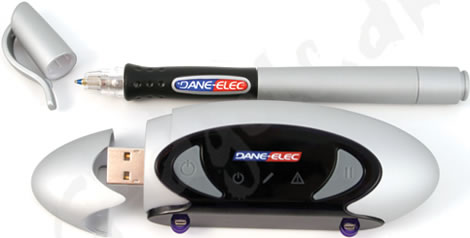
Dane-Elec Zpen

The Dane-Elec Zpen device provides you with a quick and easy way to transfer all of your handwritten notes directly to your computer, kind of like we have seen with the Iogear, the Quickies and the Mobile Notetaker.

Zpen works by attaching the receiver box onto a notepad or clipboard (up to A4 in size) and switch it on. Now you can write down whatever or as much as you want, using the Zpen ballpen, and it will be transferred directly to the memorystick in the receiver box. The memorystick can hold up to 1 GB of data = A LOT of notes!
Dane-Elec Zpen

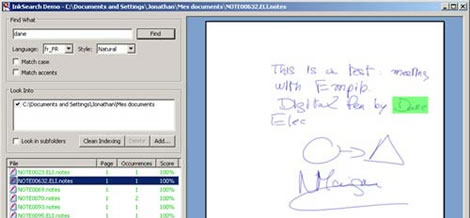
When you then are done for the day and want to transfer the notes to your PC, all you have to do is to plug it into a USB port on your PC and open one of the three “tools” that are included in the Zpen set.

The Dane-Elec Zpen is available over at the Gadgets.dk website for 899 DKK (about $186 USD).

Computers Notepad Notes Pen USB Writing
Share. Facebook Twitter Pinterest LinkedIn Reddit WhatsApp Telegram Email
Previous ArticleSherbet Colorblock – Colorful Headphones
Next Article Dual Shock USB Gamepad

Related Posts

Girl Scout Cookies Mini Notes

Doctor Who Sticky Notes

Ninja Sticky Notes

Kanex AirBlue Portable Bluetooth Music Receiver

Maxi Pad Sticky Notes

Switch Notes

Cursory Notes

Toasted Notes

Talk To The Hand Sticky Notes

Block Notes – Tetris Shaped Sticky Notes

Tron Light Cycle USB Flash Drive

iRecorder – TV to iPod without Computer

13 Comments

  1. James on July 14, 2008 3:33 pm

    what happens when the ink runs out? can you get replacements or does the ink NEVER run out?

    Reply
  2. Robert Birming on July 15, 2008 8:07 am

    The pen features a standard ink replacement solution.

    Reply
  3. Paul Davies on July 15, 2008 3:53 pm

    When it converts a page of handwritten text into computer text, does it compress the text? – you get more word processed type than handwritten words on a page – or does it simply transfer what is written on the page onto a single page on the computer?

    Am I making sense? Would be a first!

    Reply
  4. Robert Birming on July 16, 2008 1:57 am

    My guess is that it saves them as pdf files or something similar.

    Reply
  5. Mark Norris on July 25, 2008 1:41 pm

    can you edit the stored text once it is on the computer?

    Reply
  6. Robert Birming on July 28, 2008 12:49 am

    I don’t think so, but I’m not sure.

    Reply
  7. Stuart Pritchard on August 7, 2008 10:48 am

    It opens your scribblings up using your own word processing software, so you can play with it and edit it to your heart’s content.

    Reply
  8. Robert Birming on August 8, 2008 1:55 am

    Thanks a lot for the info, Stuart!

    Reply
  9. nils peterson on August 10, 2008 12:42 pm

    Does it work wit a mac or not? Never clear to me. NP

    Reply
  10. Robert Birming on August 10, 2008 1:03 pm

    Yes Nils, the Dane-Elec Zpen works with PC, Mac and Linux.

    Reply
  11. George on November 21, 2008 9:25 am

    Does it support the Greek language? If yes, I buy it tomorrow morning, if not today.

    Reply
  12. Robert Birming on November 21, 2008 11:25 am

    I’m not sure George, maybe you could try contacting the retailer for the “Dane-Elec Zpen” (link included in article) and ask.

    Reply
  13. Jason on February 18, 2009 8:24 am

    Have to correct you on the “works with mac and Linux”. It will allow you to view your notes with a Mac but will not let you edit it as the software supplied only works with PCs, unless you know of another piece of software that will work with it.

    Reply
Leave A Reply Cancel Reply

Latest

May the 4th: New Merchandise at Star Wars Shop

Rick and Morty Get Shwifty Bluetooth Speaker

Harry Potter Wizarding World Nagini Mirror

Star Wars The Mandalorian The Child Makeup Brush Holder

Funko Pop! DC Comics Wonder Woman 1984 Golden Armor Vinyl Figure

Star Wars The Mandalorian The Child Premium Plush Bundle

Taco Bell Sauces Tab Journal

Marvel Helstrom Trailer (Hulu)

Stay In Touch
  • Facebook
  • Twitter
  • Pinterest
Featured

Star Wars The Mandalorian The Child On Board Car Decal

Star Wars The Child “Baby Yoda” Animatronic Figure

Star Wars R2-D2 Deluxe Popcorn Maker

Captain America Worthy Endgame Hero Mini Backpack

Funko Pop! The Dark Knight Joker 10″ Figure

LEGO IDEAS Friends Central Perk Set #21319

Giant Edible Ghostbusters Stay Puft Marshmallow Man

Funko Pop! Diamond Collection Mulan Mushu Figure

Categories
  • All
  • Books
  • Design
  • Food
  • Gadgets
  • Style
  • Toys
  • Deals
  • Coupons
Popular Themes
  • Star Wars
  • Doctor Who
  • Batman
  • Star Trek
  • Marvel
  • The Walking Dead
  • Game of Thrones
  • Harry Potter
  • Stranger Things
Follow Geek Alerts
  • Facebook
  • Pinterest
  • Twitter
  • Newsletter
  • RSS Feed
© 2007 - 2026 GeekAlerts. All Rights Reserved.
  • About
  • Contact
  • Follow
  • Terms of Use
  • Privacy Policy

Type above and press Enter to search. Press Esc to cancel.