


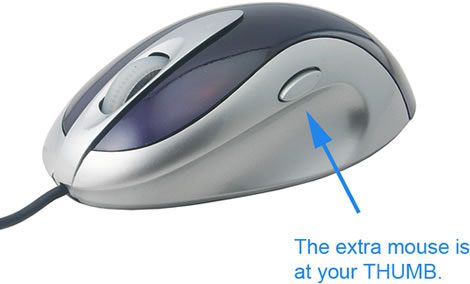
This may look like an ordinary computer mouse, but if you look closer you will notice an extra button that allows you to “protect your privacy”.
If you use it as an ordinary mouse without installing the driver, it is a short-cut key performs as the short-cut key at your right of your windows tool bar. If you’ve installed its driver and still have not yet configure it, the it works as the short cut ket “ALT + Tab”, helps you jump from Windows to windows. If you’ve installed its driver and configured it (see picture 2), then once you press the button, you can conceal any and all programs in windows and jump to your dedicated windows.
Here’s an illustration to give you an idea of how it works:

Features:
- Protect your privacy: quick click to shut your current windows
- USB interface
- Optical Technology
- Scroll Wheel, no need to rely on scroll bar again
- High precision: 800dpi
- No need for extra power
The USB Smart Privacy Mouse is available from USB Fever for $19.99.
3 Comments
There is one problem; when looking at porn you’re not having your hand on the mouse.
Jesper has a point ! 😉
Seriously… how long ago was this thing created?
* Protect your privacy: quick click to shut your current windows
Windows key + M. Problem solved. If you already have a mouse with extra buttons, just configure one of them for it. Nothing special.
* USB interface
It wouldn’t sell if it wasn’t, so worthless point.
* Optical Technology
Pfft. Haven’t you heard? We’re in the laser age now.
* Scroll Wheel, no need to rely on scroll bar again
My condo lances if you’ve relied on the scroll bar in the past seven years… perhaps you should come out of your cave?
* High precision: 800dpi
2000dpi with mah lazer. See two comments up.
* No need for extra power
Since when has a mouse ever required extra power? That would just be dumb.