


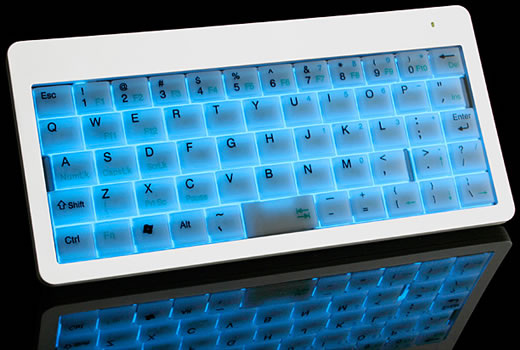
Remember the Super-Tiny USB Keyboard that we wrote about a couple of months ago? An illuminated version of this small 56 key computer accessory will soon be available.
Features:
- Low keycap notebook keyboard with 56 KEYS
- Fn/Num lock change function
- Small, lightweight and portable
- Illumination feature
- Slim body that save working place
- Available USB port
- Operating distance: 10 meters
- Operating frequency: 2.4GHz Radio Frequency
- Dimension: 170 x 81 x 15mm (approx.)
- Weight: 138g
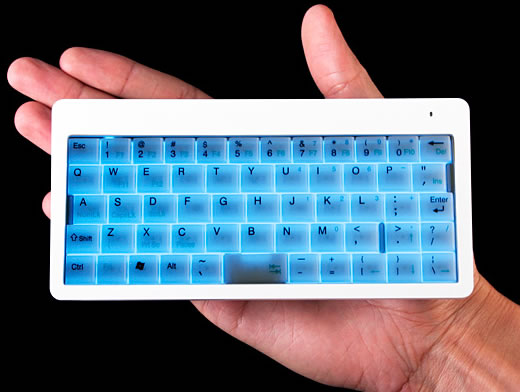
The Wireless Illuminated Super-Tiny Keyboard can now be pre-ordered form the USB Brando website for $47. The product will ship at the end of December.
18 Comments
Ow, looks so nice~! Especially the compact design with the blue illumination. Oh I just love glowing stuff! Will add this to my blog. 😉
Looks life this fellow got really long fingers…
A bit too tiny for me, and Jean-Paul those are some long fingers.
Keyboards, for me at least, are funny things; it’s all about the feel of the keys. Still, it’s a good idea having them back lit…
Wow, this looks much cooler than the keyboard with backlight that Verbatim just launched
It will become one of my kid’s toys and eventually disappear somewhere under the bed or sofa…
ohlalal gimmie gimmie!
Thank you all for stopping by, commenting and posting via-links!
I think I am gonna try this one out!
Nice post, many thanks for sharing.
Keith Johnson
Technical Writer
Hallandale Beach, FL, USA
Photoshopped, look at the fingers.
Hiya Everyone,
Just received my Brando Wireless Illuminated Super Tiny Keyboard (The proper name according to the Brando Order Page). It took a fast 8 Days to SoCal from Hong Kong, Air Mail (11 Days from order date). The people at Brando USB WorkShop are very friendly, and answered my inquiry within 12 Hours. Here are my first impressions:
(1) The photos of it do not do it justice. It looks much better, and the construction quality is superb.
(2) They didn’t say it has a power saving function, but it does. After a couple of minutes of idleness the backlight shuts off. Nice.
(3) It works very well. Quick and precise.
So, my first impressions are all positive. Money well spent.
Thank You, Bramdo USB WorkShop, and Thank You Geek Alerts for your alert.
Very small indeed, can get crushed when stored with other peripherals inside a laptop bag. But useful enough if you really need an emergency data entry anywhere you want, but not good for fast typing since many keys are reorganized.
Wow, it looks so lovely.
coooooool…..
Low keycap notebook keyboard with 56 KEYS
Fn/Num lock change function
Small, lightweight and portable
Illumination feature
i like.
Hello Again All–Update Time,
I have now been using this device for over Seven Months, and thought I should add an update. My first Keyboard failed–battery connect problem that made it go all wonky, and Brando Air Mailed me a new one Pronto, which works fine. Great Customer Service with no questions asked–THX Kevin and Brando.
I almost never use my older Wireless Keyboard anymore, just the Brando with Two-Thumbed typing.
There is ony one Negative to this device–it eats Batteries like an Anteater eats Ants; really–1 to 2 Days moderate use for two Alkaline AAAs. I figured that I would spend hundreds of US Dollars a year powering it. Not Good. So I researched the new Hybrid Rechargeable Batteries, and for under US $27 I bought a Ray-O-Vac Charger that came with 2 AA and 2 AAA Hybrids, plus 4 AAA Hybrids (Amazon.com). Problem solved. I just rotate the 6 AAAs, two at a time, and use the 2 AA in a Flashlight. Well worth the money, and this system works great. Don’t let this Anteater-like quality dissuade you from buying this Keyboard–it is one of the Best (of many) Electronic Devices I’ve purchased in the last few years.
Cheers,
Danny Oh
Hello,
My PC worked not correctly, many mistakes and buggs. Help me, please to fix buggs on my computer.
I used Windows XP.
Thanks,
Mataenadeom
wow it so cute and tiny i like it
Will Make one user feel like he is using a Smartphone keyboard